Instantly split text into individual layers by characters, words, lines, or paragraphs in After Effects.
Subscribe to my mailing list to download for free.
You can unsubscribe at any time. I promise not to spam you.
Already have an account? Log in to download
How to Use Split Text
Basics
- Select one or more text layers
- Click the
Split Textbutton to split by the current mode - Each unit becomes its own layer with proper positioning
Changing Split Mode
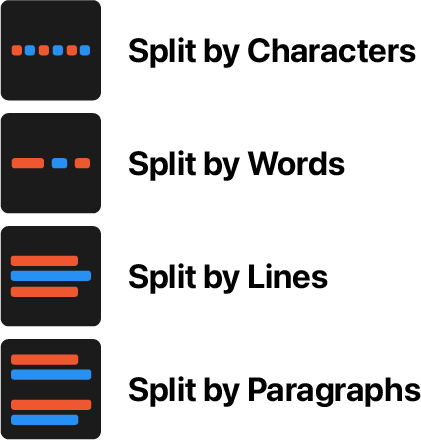
Right-click Split Text to choose your mode:
What Gets Created
- Individual text layers for each character, word, line, or paragraph
- A controller null that parents all split layers
- Layers are named based on content (e.g., "Hello - H", "Hello - e"
- Duplicate characters or words get numbered (e.g., "Hello - l", "Hello - l - 2")
Behavior
- Maintains original text styling and positioning
- Handles multi-line text with proper alignment per line
- Correctly positions lines and paragraphs even when blank lines are present
- Original text layer is disabled but preserved

Installation
Copy the Split Text.jsx file into your After Effects ScriptUI Panels folder, then restart After Effects.
- OSX:
/Applications/After Effects #version#/Scripts/ScriptUI Panels/ - Windows:
/Program Files/Adobe/Adobe After Effects #version#/Support Files/Scripts/ScriptUI Panels/
Changelog
If you've already downloaded Split Text, log in to your account and visit My Products to get the latest version.
1.0.2
Released: 2026-03-18
- Fixed JSON polyfill that could interfere with third-party tools
1.0.1
Released: 2025-12-17
- Updated to handle separate position dimensions correctly
1.0.0
Released: 2025-12-17
- Initial Release