Arrange layers in a radial rig with custom controls for animating in 2D and 3D.
Subscribe to my mailing list to download for free.
You can unsubscribe at any time. I promise not to spam you.
Already have an account? Log in to download
How to Use Roundabout
Basics
- Select the layers you want to distribute
- Click the
Roundaboutbutton - A
Roundabout Controllernull is created, and selected layers are distributed radially around it - Adjust the effect controls on the null to customize and animate the arrangement
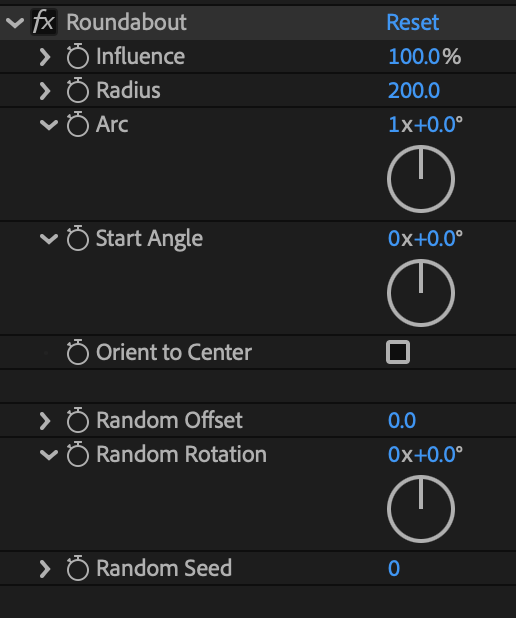
2D Controls
- Influence: Blends between original and radial positions
- Radius: Distance from center
- Arc: Degrees of arc to fill (360 = full circle)
- Start Angle: Where the distribution begins
- Orient to Center: Rotates layers to face outward from center
- Random Offset: Adds position randomness
- Random Rotation: Adds rotation randomness
- Random Seed: Changes the random pattern
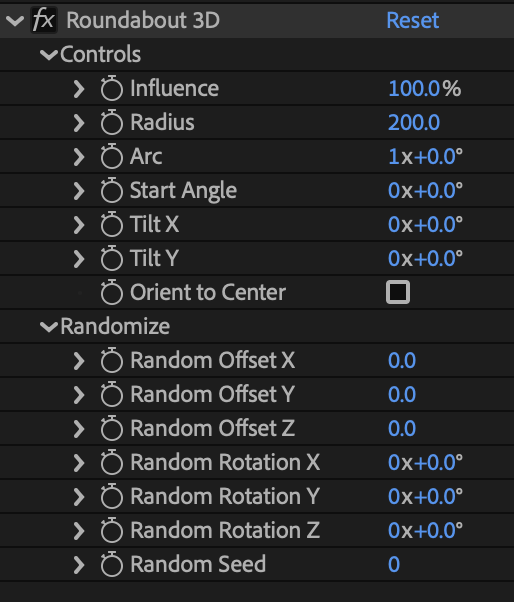
3D Controls
When using 3D layers, you get additional controls:
- Tilt X: Tilts the arrangement plane forward/back
- Tilt Y: Tilts the arrangement plane left/right
- Random Offset X/Y/Z: Per-axis position randomness
- Random Rotation X/Y/Z: Per-axis rotation randomness
Behavior
- Automatically detects 2D vs 3D layers and applies the appropriate controls
- Remove layers from the rig by selecting rigged layers and clicking the Roundabout button
- Add layers to an existing rig by selecting them with the Roundabout Controller and clicking the Roundabout button
- Layer stacking order determines distribution order
Installation
Copy the Roundabout.jsx file into your After Effects ScriptUI Panels folder, then restart After Effects.
- OSX:
/Applications/After Effects #version#/Scripts/ScriptUI Panels/ - Windows:
/Program Files/Adobe/Adobe After Effects #version#/Support Files/Scripts/ScriptUI Panels/
Changelog
If you've already downloaded Roundabout, log in to your account and visit My Products to get the latest version.
1.0.3
Released: 2026-01-15
- Fixed a bug preventing some users from using Roundabout
1.0.2
Released: 2025-12-18
- Updated to allow offset of layer rotation when using orient to center
1.0.1
Released: 2025-12-18
- Updated to handle separate position dimensions
1.0.0
Released: 2025-12-16
- Initial Release