
Batch rename layers, groups and properties in After Effects with the click of a button.
Subscribe to my mailing list to download for free.
You can unsubscribe at any time. I promise not to spam you.
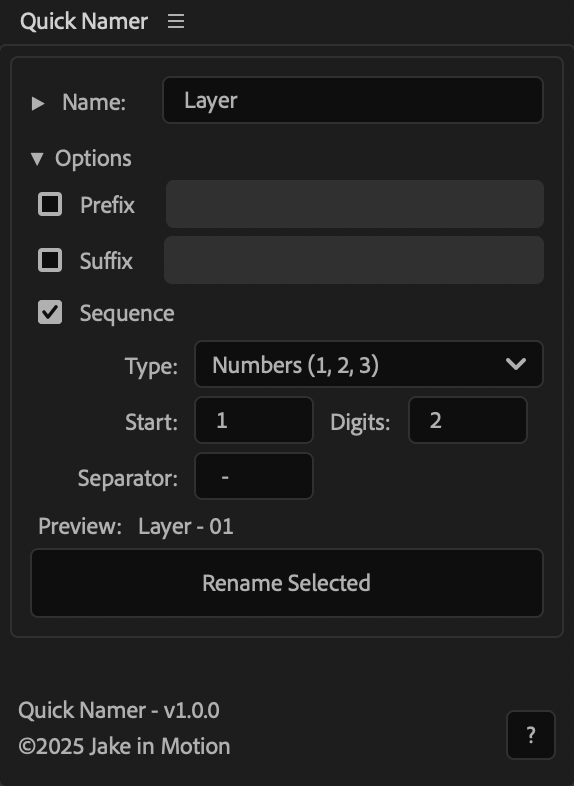
How to Use Quick Namer
Basic Renaming
- Select one or more layersin the order you want to rename them
- Enter a new name in the
Namefield - Click
Rename Selected
Find & Replace
- Select layers or properties
- Enter the text you want to find in the
Findfield - Enter the replacement text in the
Replacefield - Enable
Match casefor case-sensitive matching - Click
Rename Selected
Adding Prefixes & Suffixes
- Prefix: Adds text before the name (e.g., "BG_" becomes "BG_LayerName")
- Suffix: Adds text after the name (e.g., "_v1" becomes "LayerName_v1")
Sequential Numbering
- Enable
Sequence - Choose your format:
- Numbers: 01, 02, 03...
- Uppercase letters: A, B, C...
- Lowercase letters: a, b, c...
- Set
Startto choose where numbering begins - Set
Digitsfor zero-padding (2 digits = 01, 3 digits = 001) - Set
Separatorfor the character between name and number (e.g., "_" becomes "Layer_01")
Note
- Quick Namer works on layer properties, groups, and effects, but, due to an After Effects limitation, will always sequence from the top down.
Installation
Copy the Quick Namer.jsx file into your After Effects ScriptUI Panels folder, then restart After Effects.
- OSX:
/Applications/After Effects #version#/Scripts/ScriptUI Panels/ - Windows:
/Program Files/Adobe/Adobe After Effects #version#/Support Files/Scripts/ScriptUI Panels/
Changelog
If you've already downloaded Quick Namer, log in to your account and visit My Products to get the latest version.
1.0.3
Released: 2026-03-18
- Fixed JSON polyfill that could interfere with third-party tools
1.0.1
Released: 2025-12-16
- Updated Help Dialog
1.0.0
Released: 2025-12-14
- Initial Release