Free After Effects Extension
Browse, preview, search, and apply all After Effects presets, all from one panel. Favorite the ones you use, group them into collections, and see video previews before you apply them.
Subscribe to my mailing list to download for free.
You can unsubscribe at any time. I promise not to spam you.
Already have an account? Log in to download
See it in action
What is Preset Browser?
Preset Browser is a free After Effects panel for finding, previewing, and applying the animation presets already on your machine.
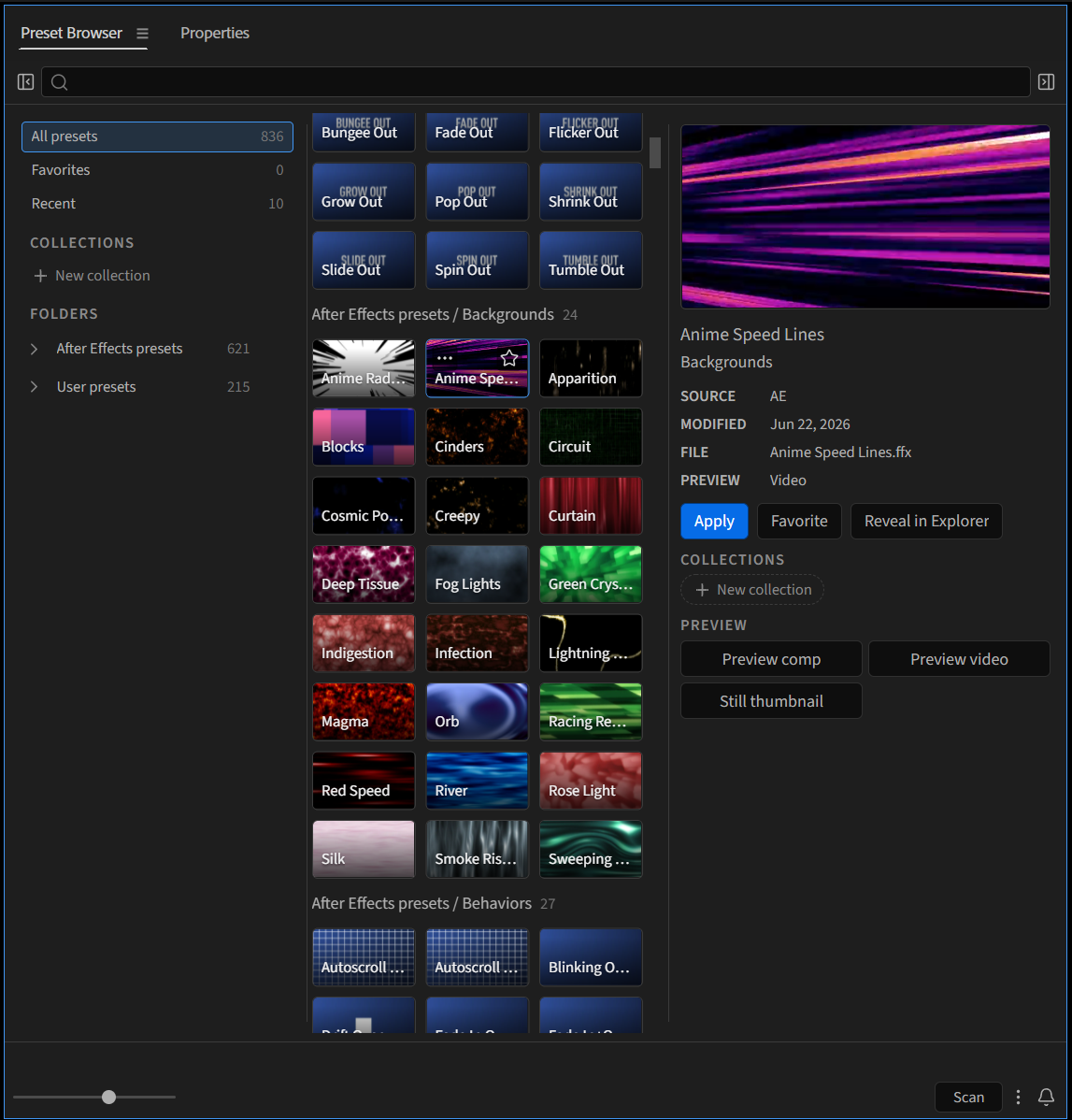
After Effects ships with over 600 presets, but Effects & Presets gives you a folder tree full of names that don't tell you much. Preset Browser turns them into a visual library you can search, preview, and apply in one click.
Previews of all the bundled presets are included, and you can use Preset Browser to quickly build previews of your own presets.
What it does
Preview before you apply
Adobe's presets come with previews, so you can see what a preset does before it touches your layer.
Search everything
Find a preset by its name, filename, or category.
Favorites and Recent
Star the presets you reach for, and get back to the ones you just used.
Collections
Group presets into collections for a project, a client, or a look.
Your own presets too
Presets saved to your User Presets folder show up alongside Adobe's, and you can render previews for them right from the panel.
Getting Started
Installation
- Download Preset Browser from your product library
- Extract the contents of the downloaded zip file
- Install the ZXP using a tool like AE Scripts' ZXP Installer.
- Open/Restart After Effects
- Find Preset Browser in Window > Extensions > Preset Browser
License (tl;dr)
✅ Free to use in personal or commercial projects.
✅ You can modify it for your own use.
❌ You can’t redistribute, resell, or upload it anywhere.
❌ Always download from jakeinmotion.com.