Instantly build parent chains from layers, paths, or puppet pins.
Subscribe to my mailing list to download for free.
You can unsubscribe at any time. I promise not to spam you.
Already have an account? Log in to download
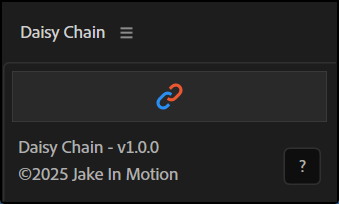
How to Use Daisy Chain
Chaining Layers
- Select 2 or more layers in the order you want them chained (first selected = root)
- Click the
Daisy Chainbutton - Layers are parented in sequence
Chaining Path Points
- Select a path property (or a shape layer with paths)
- Click the
Daisy Chainbutton - Parent nulls are created for each path point and chained in the same order in which the path was drawn
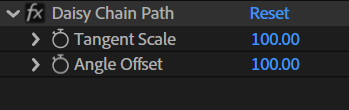
Chaining Paths + Tangents
Angle OffsetandScalecontrols are automatically added to nulls for path points with bezier tangentsTangent Scaleresizes the handle length based on how they were drawnAngle Offsetadjusts the influence of the parent null's rotation on the tangents. 100 = full influence, 0 = no influence, 50 = half influence
Chaining Puppet Pins
- Select 2 or more puppet pins (or a layer with puppet pins)
- Click the
Daisy Chainbutton - Confirm or reverse the pin parent order in the dialog
- Parent nulls are created for each puppet pin and chained together
Behavior
- First item becomes the root (no parent)
- Each subsequent item is parented to the previous one
Installation
Copy the Daisy Chain.jsx file into your After Effects ScriptUI Panels folder, then restart After Effects.
- OSX:
/Applications/After Effects #version#/Scripts/ScriptUI Panels/ - Windows:
/Program Files/Adobe/Adobe After Effects #version#/Support Files/Scripts/ScriptUI Panels/
Changelog
If you've already downloaded Daisy Chain, log in to your account and visit My Products to get the latest version.
1.0.0
Released: 2025-12-19
- Initial Release